How Much Does Web Server Proximity Affect Web Site Speed?
 7
7 2
2 1
1 0
0

It has long been suggested that having a web server located in close physical proximity to the majority of your user base is an important element to having a fast web site. This assertion makes sense in that the closer one computer is to another, the shorter the distance data has to travel. Additionally, when a user accesses a web site, the data sent and received in the process is routed through several networks. In general, the closer the site visitor is to the web server, the fewer networks the data passes through; the fewer networks that must be passed through, the less interference external factors are likely to have on the transaction.
But in this era of insanely fast fiber optic networks, is the speed difference between a server located 100 miles away, and one located 10,000 miles away really even significant? As there are so many factors that can have an influence on data transmission rates (such as other connections to the web server, or on any of the intermediary networks between the server and the user), it would be very difficult to run a scientific, controlled test on the importance of the physical distance between a web sever and a web user. As such, I decided to run my own, non-scientific test to gauge the influence of server proximity.
The Test Results
For the test I selected ten cities, three US-based and seven international. I connected to Speedtest.net and tested the download speed from five servers closest to each city. Here are my results (note that the speeds listed are in Mbps and the distances listed are in miles, from Milwaukee, WI, where Regal Creative is located):
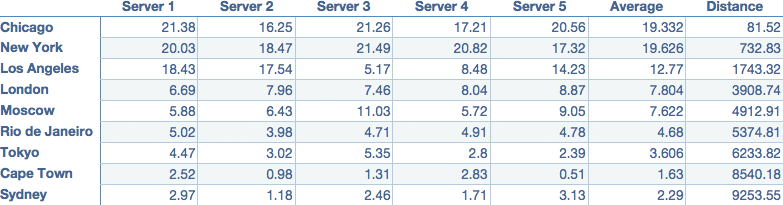
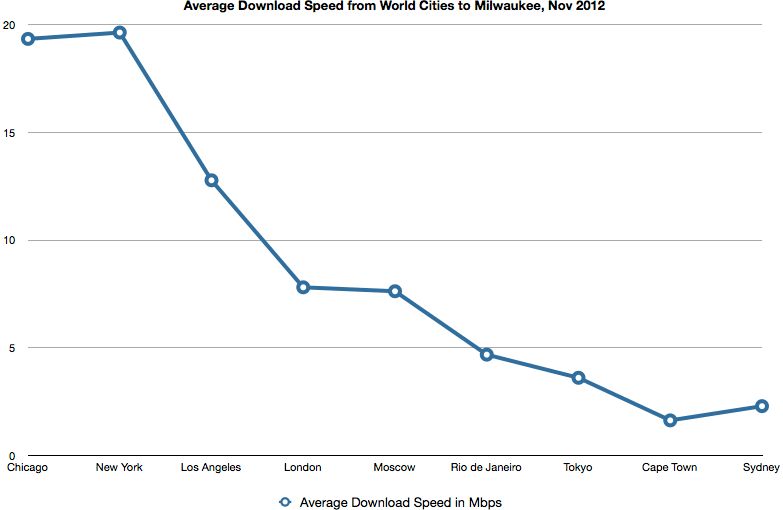
The two closest groups of servers, Chicago and New York, made excellent use of our 20 Mbps connection; Los Angeles showed a significant drop in speed, and our download speed plummeted to less than half of the optimum rate when using servers on other continents.
Reducing the Distance between your Web Site’s Data and your Users
So your web server is located in Papua New Guinea, but most of your users are in Fargo. And you have a small, but devoted following in Nairobi. What’s a web site owner to do? You could always move web servers, but an easier option would be to employ a content delivery network (CDN).
CDNs host images, scripts, video files, stylesheets, and other large-in-file-size-but-generally-unchanging elements of your website. Copies of your files are created and stored on various CDN servers throughout the world. When a user connects to your site, the CDN calculates which of its servers will deliver the files to the user in the least amount of time (generally the server closest to them), and sends out the files. This means that even if your web server is 10,000 miles away from your site visitor, the majority of your site files will be delivered to them from a server much closer. For more info about how to use a CDN for your site, check out Decrease your Bounce Rate and Increase your SEO with a CDN.
If you’re looking to reduce the load time of your web site and create a better experience for your users, regardless of their location, contact us. We’ve helped our clients build screaming fast content management system websites.